

AI Browser Automation Is Unstable — 99% of the Time, It’s Not a Model Problem
What this article covers
AI browser automation instability is often blamed on models, but the real issue is fragmented browser context. When AI operates across multiple profiles and tabs, consistency breaks. The fix is a single browser chain—system Chrome + relay + DOM-first reading—for stable, continuous actions.
Who should read it
Best for readers focused on ai, agent, chrome.
Key takeaway
When AI operates across multiple profiles and tabs, consistency breaks.
AI Browser Automation Instability: 99% Is NOT a Model Problem
I just tuned OpenClaw (the lobster 🦞) to control a browser as stably as a human—and only then did I truly understand what's going on.
Many people run into issues like these:
- Random clicking
- Unexpected new windows
- Losing login sessions
- Relying on screenshots to “guess” the page
- Acting like it has no idea which tab it's in
What does this look like?
👉 Model instability
👉 Weak automation capability
But actually, it’s neither.
There’s only one real problem
AI is not living in the same browser world.
The illusion: you think it’s one browser
At first, I thought this would be simple:
Let OpenClaw control my existing Chrome:
- Open X
- Search
- Scroll
- Click links
- Switch tabs
Sounds basic, right?
But it immediately broke:
- Sometimes it used my Chrome
- Sometimes it opened a new browser
- Sometimes it had login state
- Sometimes it didn’t
People usually assume:
- Cookie loss ❌
- Session expiration ❌
- Website issues ❌
None of these are the root cause.
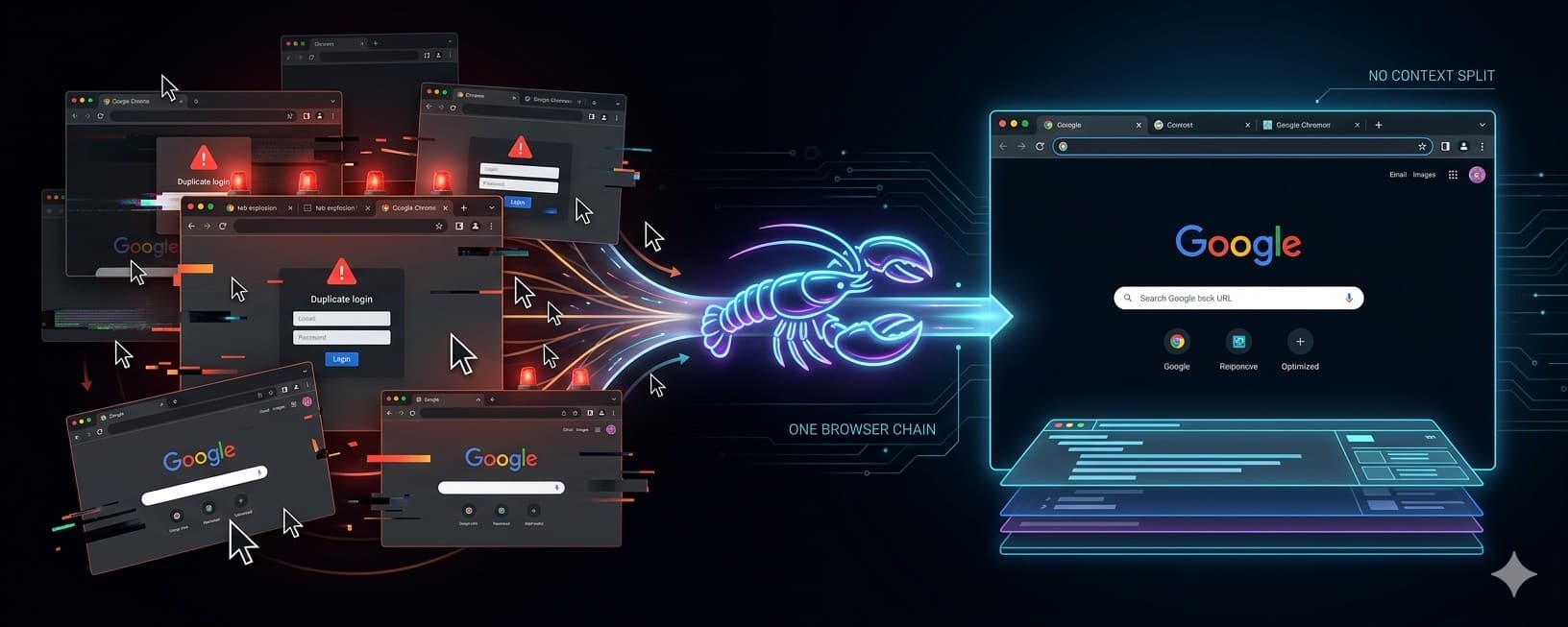
The real issue: browser context fragmentation
When OpenClaw “opens a browser”, it may go through multiple paths:
- browser_* tools
- Playwright MCP
- Chrome extension relay
- opencli
- shell commands launching Chrome
They look similar, but are fundamentally different:
- Different profiles
- Different cookies
- Different tabs
- Different DOM states
The result:
You think the AI is operating continuously
But each step may happen in a different browser context
Core insight
Whether the browser chain is unified determines everything.
Why does browser automation fail so often?
Not because it’s slow.
But because:
It’s inconsistent.
The solution: converge into a single chain
In the end, I did just one thing:
Collapse all paths into one.
The final approach (one sentence)
Keep only one browser chain:
System Chrome + Browser Relay + DOM-first reading
Architecture (3 layers)
1️⃣ Use system Chrome only
No isolated browser. No new instances.
Directly reuse your existing environment:
- X
- GitHub
- Gmail
- Slack / Feishu
- Admin panels
👉 Core idea: reuse real user context
2️⃣ Control via Browser Relay
Not MCP. Not opencli.
👉 This is what actually attaches to your current tab
3️⃣ Verify via tab state
Don’t rely on intuition.
Check this:
- chrome: running (0 tabs) ❌
- chrome: running (1 tabs) ✅
👉 This is the dividing line
The 5 key steps to stability
1️⃣ Set default browser profile = chrome
(ensure a single path)
2️⃣ Install Browser Relay extension
(this is just the start)
3️⃣ Configure the correct gateway token
(most people get this wrong)
4️⃣ Manually turn ON relay in the target tab
(this is the real attach)
5️⃣ Disable fallback
(no silent switching to other browser paths)
Further optimization (make it “human-like”)
✅ Optimization 1: DOM-first, not screenshots
- snapshot / evaluate → structured data ✅
- screenshot → guessing ❌
👉 This determines whether operations can be continuous
✅ Optimization 2: scroll using JS
Fixed pattern:
window.scrollBy(...)
Then:
- wait
- read again
👉 Actions must be repeatable, not improvisational
After fixing this, the change is dramatic
- No more new unauthenticated windows
- Continuous workflows across X / GitHub
- Stable scrolling + reading + clicking
- No more “random automation behavior”
You’ll feel the difference immediately:
It’s no longer a script that occasionally works
It becomes a true browser-operating agent
Three key takeaways
AI instability is not about intelligence
It’s about living in multiple browser worlds
The biggest problem in browser automation
is not speed, but context fragmentation
The goal is not to give AI a browser
but to make it stay in one consistent chain
What’s next
If you’re building AI agents or browser automation, you will hit this problem.
I’ve packaged this approach into an internal skill:
👉 auto-chrome-control
It will be shared in the DeepCarry member community.
Related Articles
OpenClaw Agent Team: How to Decide, Organize, and Validate Multi-Agent Work
OpenClaw Agent Team is DeepCarry's practical framework for multi-agent collaboration. It explains how a lead Agent, specialist sub-agents, and a dedicated validation Agent divide work, synthesize evidence, and deliver accountable outcomes.
May 17, 2026
Your OpenClaw Is Exposed to the Internet — And It’s Being Scanned
In just two months, OpenClaw has surged in popularity—but also in risk. As of March 2026, over 540,000 agents are exposed to the public internet. Many users think they’re running locally, but are actually exposing full AI control systems. This article reveals the risks and how to check exposure.
March 18, 2026
What exactly is AI Native?
Most people have heard the term “AI-native,” but few can clearly define it. This article explains AI-native in one sentence and introduces a five-level maturity model—showing how to move from simply using AI to building reusable, verifiable, and evolving AI-driven systems.
February 20, 2026
The Most Unsettling Workstation I’ve Ever Seen: No One There, Just a Computer Working.
AI employees are no longer a concept. From enterprise agents to open-source execution systems, AI can now take tasks, operate tools, and deliver results. The shift isn’t sudden layoffs — it’s the gradual transfer of execution authority.
February 12, 2026
Comments
0 totalLoading comments...